 Social Backup
Back up your posts.
Keep a copy of your X, Instagram and Facebook posts. Just scroll your profile and the extension saves them as you go.
- Your copy stays on your computer.
- Download your posts and photos anytime.
- Public posts also appear on Nostr, so new readers can follow you.
Free and open source. For Chrome and Firefox on a computer.
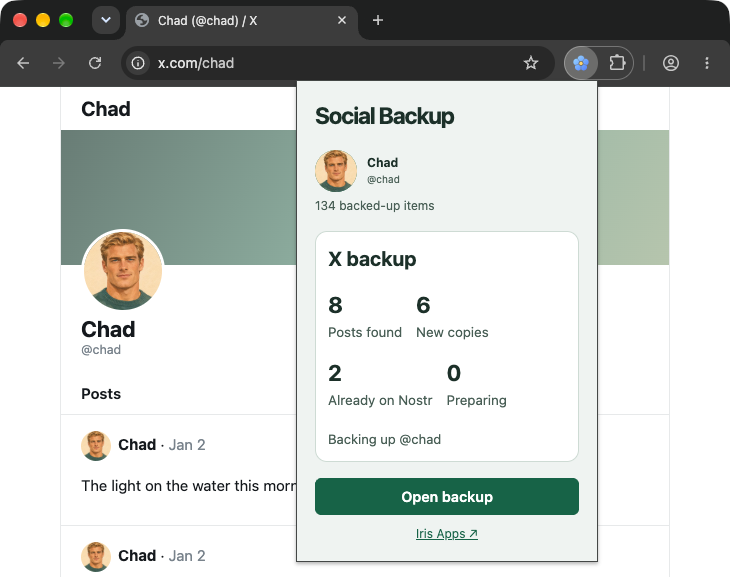
How it works
-
Make a profile
Click the Social Backup icon and choose Create profile. Then choose X or Instagram & Facebook, enter your username, turn on backup and choose Save.
-
Scroll your profile
Visit your profile and scroll. Posts are saved as they appear, older ones too.
-
Download your copy
Choose Download ZIP. To include photos and videos, first choose Media → Back up media.

Why keep a copy?
Don’t lose your posts
If a platform suspends your account or goes down, you still have your posts. You can read them offline, anytime.
Reach new readers
Your public posts also appear on Nostr, an open social network no single company controls. People can find and follow you there without using the original platform.
Install
Social Backup isn’t in the browser stores yet, so adding it takes a few extra clicks.
Chrome Easiest
Download for Chrome- Unzip the download.
- Type
chrome://extensionsin the address bar and turn on Developer mode. - Choose Load unpacked and select the folder you unzipped.
Firefox 140 or newer
Download for Firefox- Type
about:debugging#/runtime/this-firefoxin the address bar. - Choose Load Temporary Add-on and select the download.
Heads up: Firefox removes the extension when it restarts. Download your copy before closing Firefox.
Don’t see the icon? Open your browser’s extensions menu (the puzzle piece) and pin Social Backup.
Safari Experimental, needs Xcode
On a Mac with Xcode, unzip the package into a folder named social-backup-safari, then run this command from its parent folder. Open the generated Xcode project and build the app.
xcrun safari-web-extension-packager social-backup-safari --app-name "Social Backup" --macos-onlyQuestions
What gets shared?
Only posts that are public on the original site. They appear on Nostr, where anyone can read them, and can’t be taken back once shared. Private posts stay on your computer and are only in your download.
What is my secret key?
When you create a profile, the extension makes a secret key. It works like a password for your Nostr profile, but it can’t be reset. Choose Account → Copy secret key and keep it somewhere safe. Never share it.
Already have a Nostr profile?
Choose Sign in instead of Create profile and paste your secret key. The extension also saves a copy of your existing Nostr posts.
Can I sign in to other sites with it?
Yes, on sites that support Nostr login. Choose the browser extension and approve the sign-in. No separate username or password needed.
Does it cost anything?
No. It’s free, and anyone can read the source code.